
Approval & Tasks
Know exactly where every item stands, without chasing anyone down.
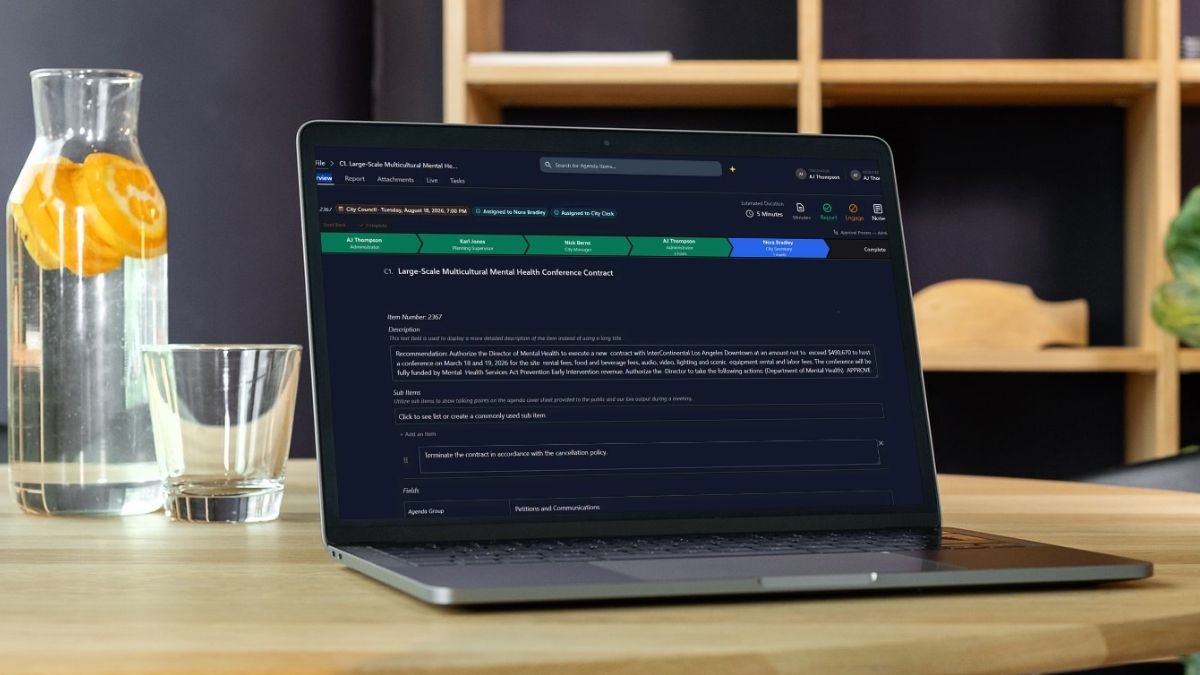
Say goodbye to "where is this approval?"
Approval workflows shouldn’t require an email being at your desk.
JustMeetings makes approval status visible at a glance and lets approvers act from anywhere, so items keep moving instead of stalling out in someone’s inbox.
Daily detours...
- An item stuck for a week with no one noticing until someone asks
- Approving documents from a desktop only, never on the go
- Staff permissions that don't match how departments are actually organized
But with more good days...
- Color-coded tracking that shows exactly how long an item's been sitting
- Mobile approvals from anywhere
- Role-based permissions that mirror your real org chart
- Filterable history panel shows an item's full routing record in seconds
- Sensitive attachments stay hidden from public search with a single checkbox
What if you could...

CUT THE RISKS
Keep documents hidden from public search until you're ready to release?

SKIP THE BUSYWORK
Approve a document from your phone without downloading a single file?

GET THE HELP YOU NEED
See every item's approval status as a visual progress bar instead of a raw log?
Approvals & Tasks
An approval workflow routes agenda items through the right people, in the right order, before they’re published. Done well, it should be fast, transparent, and trackable without requiring staff to manually follow up on every item.
Accountability
See Exactly Where Things Stand
A color-coded, time-stamped pipeline, green for done, blue for current, amber for skipped, makes a stalled item obvious at a glance, and a filterable history panel shows the complete routing record on demand.
Transparency
Approvals on the Go, From Anywhere
None of it requires a desk: approvers get a simplified mobile view with large Approve and Send Back buttons, and every approval, task, and comment emails a direct login link straight to whoever's next.
Compliance
Attachments When You Need Them
Attachments can be marked "not public" with a single checkbox, hidden from the packet and public search while staying visible to the board, and cross-department visibility can be toggled off pre-publish.
Access Rights
Control Access Without Worry
Lock settings, automatic or manual, protect finished items, and edit-override permissions can bypass assignment when needed.
Collaborate
Work Together in a Unified Platform.
Tasks, mentions, and internal comments let staff loop in a colleague without touching the formal approval chain or ever becoming public. Send Back and permission-based step-skipping handle backward and fast-tracked moves, always with a record of who did it.
Frequently Asked Questions
Yes, an optional auto-lock-on-complete setting does this agency-wide, and a manual lock is also available for authorized users independent of that setting.
Yes. Permissions can be scoped by board, for example a user allowed to manage planning and zoning meetings but not city council.